LocalSend APK for Android Download Latest Version 2026
44 MB
V1.2
Android 7.0+
435
Description
Introduction
Sharing files between Android phones, computers, and other devices should be simple and convenient. However, traditional file-sharing methods often require cables, mobile data, cloud storage, or third-party services. LocalSend offers a practical solution by allowing users to transfer files directly between nearby devices through a local network. With LocalSend APK for Android, you can share photos, videos, documents, and other files without uploading them to an online storage service.
Whether you want to send pictures to your laptop, transfer documents to another phone, or share large videos with friends, this application makes the process easier. It supports multiple operating systems, including Android, Windows, macOS, Linux, and iOS. Furthermore, its open-source approach and encrypted transfers make it an interesting option for people who value convenience and privacy. In this guide, you will learn how the application works, how to install it, and how to use its important features.
What Is LocalSend?
LocalSend is a free, open-source file-sharing application that allows users to exchange files between nearby devices. Unlike many traditional sharing services, it does not depend on cloud storage or an active internet connection to transfer files.
Instead, the application uses your local Wi-Fi network or LAN to establish communication between compatible devices. Once connected to the same network, devices can discover each other and exchange selected files directly.
The LocalSend APK for Android provides an easy way to access this functionality on Android smartphones and tablets. You can use it to send individual files, multiple documents, photos, videos, and other supported content.
Another important advantage is its cross-platform compatibility. For example, you can use the Android application to send files to a Windows computer or an iPhone running the corresponding application.
How Does LocalSend APK for Android Work?
The application works through a local network connection. Both sending and receiving devices must be connected to the same network so they can discover each other.
Here is how the process works:
- Install LocalSend on both devices.
- Connect both devices to the same Wi-Fi network.
- Open the application on each device.
- Select the files you want to share.
- Choose the receiving device.
- Accept the incoming transfer when prompted.
The application then transfers the selected content directly over the local network.
Important: You do not need an active internet connection, but you generally need a functioning local network. A Wi-Fi router can provide this connection even when it has no internet access.
Popular Types of File Transfers Using LocalSend APK for Android
LocalSend supports different file-sharing situations. Instead of limiting users to phone-to-phone transfers, it provides a convenient way to exchange content across supported platforms.
Here are some common uses.
1. Android to Android File Transfer
This is one of the simplest ways to use the application. You can send pictures, videos, music, documents, and other files between two Android smartphones.
Both users need the application installed and connected to the same local network. Afterward, they can select their devices and begin sharing.
2. Android to iPhone File Transfer with LocalSend APK
Moving files between Android and iOS devices can sometimes be inconvenient. LocalSend provides an alternative to cloud-based sharing services.
Install the application on both devices, connect them to the same Wi-Fi network, and select the required files. The receiving user can then accept the transfer. This makes Android to iPhone file transfer more convenient without requiring both users to use the same mobile operating system.
3. Android to Windows PC Transfer
You can also use the application to move files from an Android smartphone to a Windows computer. For example, students can transfer assignments, while professionals can move office documents, presentations, and other important files. Install the desktop version on your computer and connect it to the same local network as your phone.
4. Android to Mac File Sharing
Mac users can also receive files from Android devices through LocalSend. It is useful when you want to move photographs, videos, or documents without connecting a USB cable or uploading everything to cloud storage.
5. Sharing Files Between Android and Linux
LocalSend also supports Linux distributions. Therefore, users can exchange files between Android devices and compatible Linux computers. This feature is particularly useful for developers, students, and people who regularly work across different operating systems.
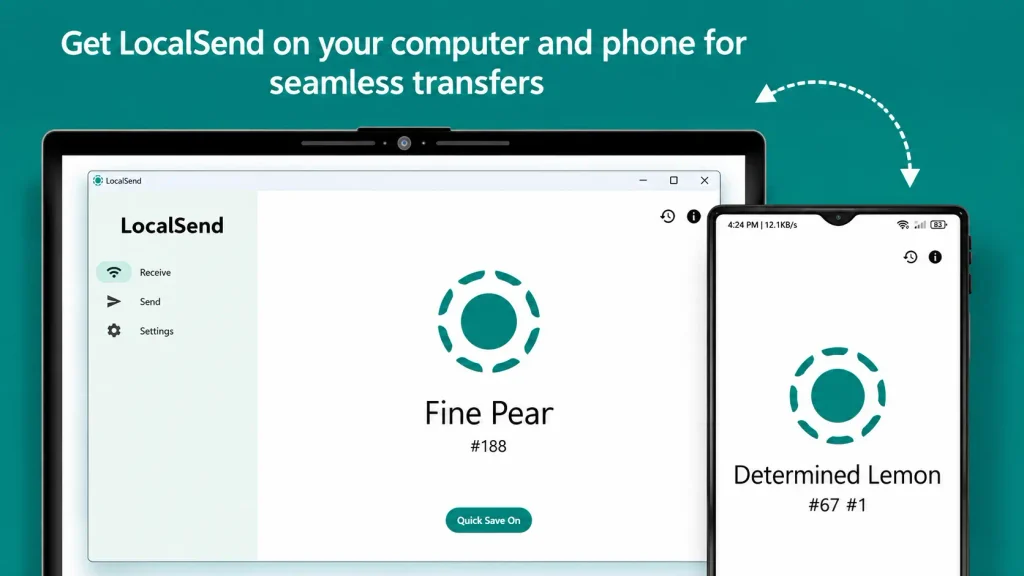
Don’t Miss: Wifi Pass Key Wifi Hotspot Android APK Free Download Latest Version
How to Get Started With LocalSend APK for Android
Getting started is relatively straightforward. However, you should download the application from a trusted source and check your device compatibility before installation.
Check Android Compatibility
Before downloading, make sure your smartphone meets the minimum system requirements. The current official compatibility information lists Android 7.0 or later for supported releases.
If your device uses an older Android version, you may need an earlier compatible release. However, older versions might not include the latest improvements and security fixes.
Find the Official Download Source
For a safe LocalSend APK Download, visit the official project website or its GitHub releases page. You can also install the application through Google Play. Avoid unknown websites that distribute modified APK files because they may contain unwanted software or introduce security risks.
Download LocalSend APK for Android
Choose the appropriate Android installation package if you are downloading directly from GitHub. Different APK builds are available for different processor architectures, including ARM32, ARM64, and x64.
Most modern Android smartphones use ARM64, but you should check your device specifications if you are unsure. The LocalSend APK for Android should always come from an official or trusted distribution source.
Install LocalSend Android Application
If you download the APK manually, follow these instructions:
- Open your phone’s Downloads folder.
- Locate the downloaded APK file.
- Tap the file to start installation.
- If Android asks for permission, allow installation from that specific source.
- Complete the installation process.
- Open the application.
For better security, disable the permission to install unknown apps again after completing the installation. If you install through Google Play, you can skip these manual steps.
Connect Both Devices to the Same Network
Open the application on your Android phone and the receiving device. Make sure both devices are connected to the same Wi-Fi network. You can use a local wireless network without an active internet connection. If the devices cannot discover each other, check whether your router has client isolation or guest-network restrictions enabled.
Select and Send Files
Open the Send section and choose the content you want to share. You can select different types of files, including:
- Photos and images
- Videos and audio
- PDF documents
- Office files
- Other supported files and folders
Next, select the receiving device from the available device list.
Accept the Incoming Transfer
The receiving device will display an incoming transfer request. Review the sender and the selected content before accepting. Once approved, the application starts transferring the files. After completion, check the receiving device’s displayed save location to find your transferred content.
Main Features and Benefits of LocalSend APK for Android
The application offers several useful features that make it a practical file-sharing solution.
1. Offline File Sharing
One of its biggest advantages is the ability to transfer files without internet access. You do not need to upload your documents to an online server or use mobile data. Instead, the application uses your local network to communicate with nearby devices. This is particularly useful when travelling, working in an office, or sharing files in places with limited internet connectivity.
2. Cross-Platform Compatibility
The application supports several major operating systems. You can exchange files between Android, iOS, Windows, macOS, and Linux devices. Consequently, users do not need to rely on the same operating system to share content.
3. Encrypted File Transfers
Privacy is an important consideration when sharing personal or professional documents. LocalSend uses HTTPS and TLS encryption for communication between devices. This helps protect transferred content while it travels across the local network.
However, encryption does not eliminate every possible security risk. Always verify the receiving device before sending confidential information.
4. Open-Source Software
LocalSend is an open-source project. Its source code is publicly available, allowing developers and interested users to examine how the software works.
This transparency provides an additional level of confidence compared with applications that do not make their source code available.
5. No Cloud Storage Requirement on LocalSend APK for Android
Traditional file-sharing applications sometimes require users to upload files to external servers before downloading them on another device.
LocalSend takes a different approach. It transfers files directly between connected devices through the local network. Therefore, you do not need to create a cloud storage account to use its basic file-sharing functionality.
6. Simple User Interface
The application has a straightforward interface that makes its main functions easy to understand. You can access the sending and receiving options without navigating through complicated settings. This makes it suitable for beginners as well as experienced Android users.
7. Sharing Multiple Files
You can select multiple items instead of transferring everything individually. For example, you can send several photographs, documents, or videos in one transfer session. This saves time when moving content between your smartphone and computer.
8. No Advertisements
The official application does not include conventional third-party advertisements. This creates a cleaner experience and allows users to focus on transferring their files.
What’s New in LocalSend APK Android App?
Keeping your applications updated is important because newer releases can introduce useful features, improve performance, and fix existing problems.
According to the official release information available in November 2026, the latest stable release is version 1.18.2, published on August 21, 2026. The LocalSend App latest version includes several improvements and fixes.
Here are some notable updates from the recent releases:
| LocalSend Version | Main improvements |
| LocalSend V1.18.2 | Improved file sharing through browser pages, compatibility fixes, and Android file-handling improvements |
| LocalSend V1.18.1 | Android and iOS compatibility fixes and updated local-network permissions |
| LocalSend V1.18.0 | Receive via link, IPv6 support, checksum verification, and background transfers on Android |
Also Check: Mentora App 2026 | AI Math Tutor Free For Android
Important Improvements on LocalSend APK for AndroidLatest Version
Receive via link: Version 1.18.0 introduced a feature that allows users to receive files through a browser-based sharing page.
Improved transfer performance: Recent releases include improvements to the underlying networking and file-handling systems.
Background transfers: Android users can benefit from background file transfers, making it easier to continue using their devices.
Checksum support: Checksum verification helps identify whether transferred files have been received correctly.
Android compatibility: Version 1.18.1 introduced an additional local-network permission required for Android 17 and later.
File-handling improvements: Version 1.18.2 includes fixes for invalid file modification times on Android.
These improvements make the LocalSend APK Latest Version a useful option for users who want a reliable local file-sharing experience. For the complete changelog, visit the official GitHub releases page before installing an update.
Tips for Beginners Using LocalSend APK App
If you are using the application for the first time, a few simple practices can help you avoid common problems.
Keep Both Devices on the Same Network
Always check the Wi-Fi connection before starting a transfer. Devices connected to separate networks may not discover each other.
Verify the Receiving Device
Check the device name before accepting a file transfer. This helps prevent accidentally sending private documents to the wrong person.
Use the Latest Compatible Version
Keep the application updated on both devices. Different versions can sometimes have compatibility issues, so updating both sides is a good troubleshooting step.
Check Storage Space
Make sure the receiving device has enough available storage for the selected files. If you are transferring several large videos, insufficient storage may interrupt the process.
Check Firewall Settings
If you are transferring files to a computer, its firewall may block LocalSend connections. The official project documentation identifies TCP and UDP port 53317 for incoming communication. Allowing the application through the appropriate firewall settings can help resolve connection problems.
Avoid Untrusted APK Websites
Download the application through official distribution channels. Do not install modified versions that promise unnecessary premium features or claim to provide unlimited transfer speeds.
Understand Offline Sharing
Remember that offline sharing does not mean devices can communicate without any network connection. Both devices still need a working local connection, such as a Wi-Fi network or a suitable local hotspot.
Pros and Cons of LocalSend APK for Android
Before installing any application, it is helpful to understand its strengths and limitations.
Pros
- Free and open-source application.
- Supports multiple operating systems.
- Transfers files without requiring internet access.
- Uses encrypted communication.
- No cloud storage account required.
- Supports multiple file selections.
- Offers a simple and beginner-friendly interface.
- No conventional third-party advertisements.
Cons
- Both devices generally need to be connected to the same local network.
- It cannot directly share files with devices that do not support LocalSend.
- Network restrictions can prevent device discovery.
- Manual APK installation requires additional care.
- Transfer performance depends on the local network and device hardware.
- Users may need to adjust firewall settings when sharing with computers.
Is LocalSend for Android APK Safe to Use?
LocalSend is an open-source application that uses encrypted communication for file transfers. Its official Google Play listing also provides developer-reported data safety information. Nevertheless, users should understand that app-store privacy disclosures are developer-provided and should not be treated as an independent security audit.
For safer use, follow these recommendations:
- Install the official application.
- Keep both devices updated.
- Accept files only from trusted senders.
- Avoid using unfamiliar public networks for sensitive transfers.
- Review the selected files before sending.
- Check the receiving device’s identity.
These basic precautions can help you use the application more confidently.
Frequently Asked Questions (FAQs)
1. What is LocalSend APK for Android used for?
It is used to transfer files between nearby devices through a local network. You can share photos, videos, documents, and other supported content without requiring an internet connection.
2. Is LocalSend APK for Android free to download?
Yes. LocalSend is free and open-source software. You can obtain its Android version through Google Play or the official GitHub releases page.
3. Can I use LocalSend without internet?
Yes. The application can transfer files without an active internet connection. However, both devices need to communicate through the same functioning local network.
4. Can I transfer files from Android to iPhone?
Yes. Install LocalSend on both devices, connect them to the same Wi-Fi network, and select the files you want to share.
5. Does LocalSend support Windows computers?
Yes. LocalSend has a Windows version that allows users to exchange files between compatible Windows computers and Android devices.
Conclusion
LocalSend is a practical solution for Android users who regularly share files between smartphones, computers, and other devices. Its local-network technology, cross-platform compatibility, encrypted communication, and simple interface make it useful for everyday file-sharing tasks.
Whether you want to move photographs, share office documents, or transfer videos between different operating systems, the application provides a convenient alternative to traditional cloud-based services. The LocalSend APK for Android is particularly useful for people who prefer direct file sharing without relying on mobile data or online storage.
However, you should always download the official version and ensure that your devices meet the compatibility requirements. Overall, if you need a free, open-source, and straightforward file-sharing application, LocalSend is worth considering.
Download links
How to install LocalSend APK for Android Download Latest Version 2026 APK?
1. Tap the downloaded LocalSend APK for Android Download Latest Version 2026 APK file.
2. Touch install.
3. Follow the steps on the screen.